About Contacts
This page features how to configure certain parts of the contact screen, here you can see how to change the following:
- Sorting Contacts
- Checking Account Expiry Date
- Deleting Contacts
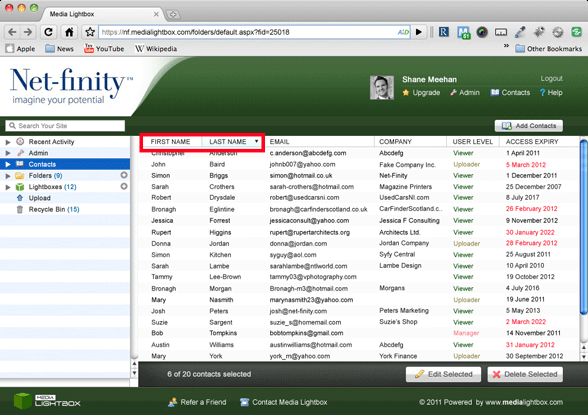
Sort Contacts
You can sort your contacts at any time from A-Z or Z-A by following the steps outlined below:
- Select the 'Contact' tab on the left of any screen
- Click the small arrow beside 'Last Name'
- Once sorted the contacts can be reverted back by clicking the arrow again
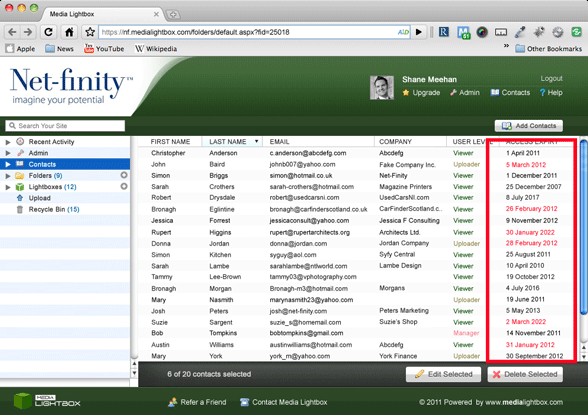
Account Expiry Date
If a manager you can check the expiry date of each contact on your account by following the steps outlined below:
- Select the 'Contact' tab on the left of any screen
- The Expiry dates are seen on the right of the screen
- The in date contacts will be highlighted in black
- The out of date contacts will be highlighted in red
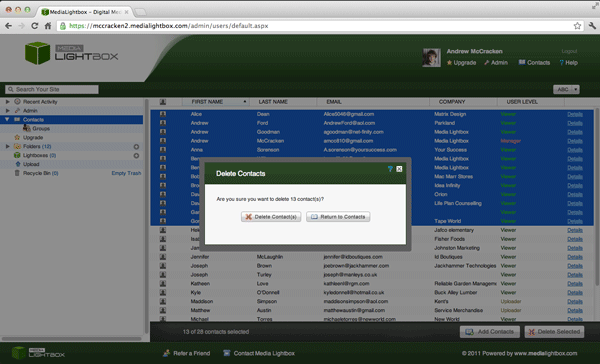
Delete Contact
You can delete your company logo at any time by following the steps outlined below:
- Select the 'Contact' tab on the left of any screen
- Your contacts should be in view, click on any one contact you want to delete, it will highlight in blue
- If you want to delete more than one contact, hold the 'Shift' keyboard and click any other unwanted contact
- If you are happy with the highlighted selection click 'Delete Selected'
- A new screen will appear asking if you are sure about deleting the selected contacts
- If you are happy with the selection made click 'Delete Contact(s)
- If you don't want to delete the selection made click 'Return to Contacts'